
|
High Level Components with Locations | 
|
Example:
SENSOR LOCATION InLane (Bus)
BusLane^: SEND Bus[1] TO InLane;
BASIC COMPONENT Road
DECLARATION OF ELEMENTS
BusLane^: SEND Bus[1] TO InLane;
BASIC COMPONENT Road
DECLARATION OF ELEMENTS
CONSTANT Ttravel (REAL) := 1.2
RANDOM VARIABLE TDelay (REAL):
RANDOM VARIABLE TDelay (REAL):
EXPO(Mean := 0.2)
LOCATION Lane (Bus): 0 Bus
SENSOR LOCATION InLane(Bus)
SENSOR LOCATION InLane(Bus)
DYNAMIC BEHAVIOUR
WHENEVER
NUMBER(InLane) > 0 AND
T >= InLane:Bus[1].TArrival
T >= InLane:Bus[1].TArrival
DO
Lane^: FROM InLane GET Bus[1];
CHANGING
CHANGING
TArrival^ :=
T + TTravel + TDelay;
END
END
END OF Road
| 1 | 1 |
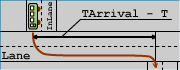
A bus is fetched onto the location Lane in the component Road as soon as its arrival time is reached. At the same time, its arrival time is set at which the bus reaches the end of the road. The next adjacent component may fetch the bus from this point.
LOCATIONS and SENSOR LOCATIONS can be connected through COMPONENT CONNECTIONS, just like model variables.
Example:
HIGH LEVEL COMPONENT BusLine
SUBCOMPONENTS
SUBCOMPONENTS
BusStop1 OF CLASS BusStop,
BusStop2 OF CLASS BusStop,
Road12 OF CLASS Road
BusStop2 OF CLASS BusStop,
Road12 OF CLASS Road
COMPONENT CONNECTIONS
BusStop1.BusLane -->
Road12.InLane;
Road.BusLane -->
BusStop2.Inlane;
END OF BusLine
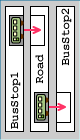
BusLane of BusStop1 is connected with the sensor location InLane of the component Road12. By this means, the location BusLane of the component Road12 can be accessed as if it were a model quantity.
